
Author: admin
How to upgrade Git on Windows to the latest version
- 0

Upgrading Git on Windows is a simple process that can be accomplished in a few minutes. You shouldn’t need to take any special action to update your Git client software; simply update the program as instructed in the installation message. You can find the version of your installed git with the below command: git –version:…
Read More How to Use Git in Android Studio
- 0
In this blog, you will learn how to use Git in Android Studio. Firstly, you will learn the basic concept of Git and then create a new project using Git. Next, you will learn how to clone and fork a repository. Next up, you will see how to push your changes online using Github. Also…
Read MoreHow to create your own Android Library and publish it
- 0
We’ll build and publish our own Android Library in this tutorial. You can use the library in all of your upcoming projects by releasing it. Additionally, other people can utilize the library for their projects. Therefore, let’s begin: Creating The Android Library Open Android Studio and create a new project. Give the name “HttpConnection”…
Read More
Playing a YouTube video in the Android application
- 0
We want to play Youtube video by streaming it directly from YouTube without downloading. Also, while playing videos, I want provide menu options. I don’t want to play video using default intent. How can we do this? There are multiple ways to play the youtube video in your android application. One of the easiest way is…
Read More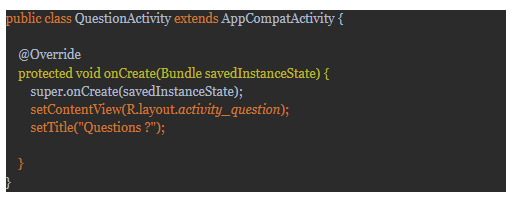
How to change title of Activity in Android
- 0
When you are using the fragments and activities together in an application, it takes the title for the fragments automatically as the names of the fragments. But for the activities, it takes the app name itself as the title of the activity, So how to change the title of the activity. There are two ways…
Read MoreHow to add a Music Player in the Blogspot
- 0
While composing the blog, you can write the content of the blog normally. Then place your cursor where you want to add the audio player. Then use any of the below methods : 1. Using Basic HTML5 Tags: The <audio> tag is a new feature of HTML5 which we can use to natively embed audio…
Read More