Adding custom title bar to the theme in android

customer. And the requirement was to have a custom header/title for the
application. That’s also horizontally center-aligned to the display.
to the theme. It’s pretty simple. I will
take the quiz example itself to demonstrate this. You just create an Android
project called a “Quiz”. Now for this
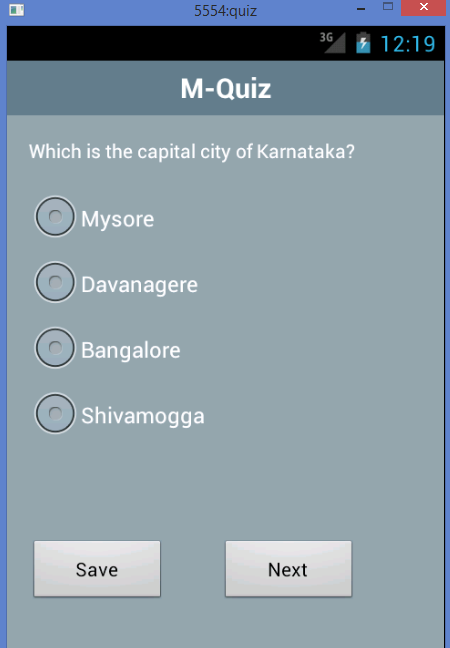
project, for each screen, we want to create the title as “M-Quiz”.
going to discuss the code related to the quiz But we are going to discuss
about how to add the custom title bar for this application.
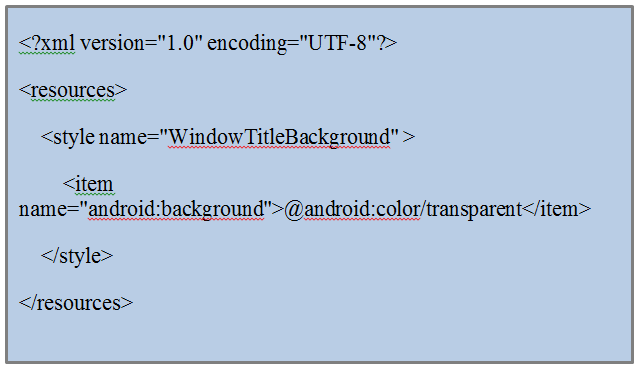
the styles.xml in the res/values folder. If this file is not there, you can create
one.
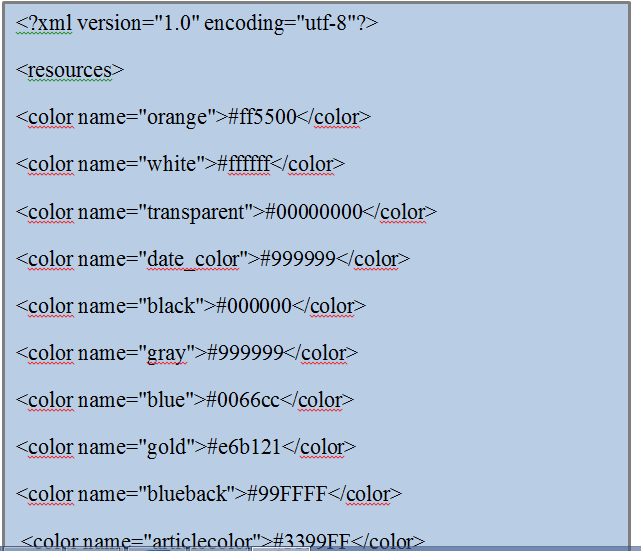
to use in our application. Create a colors.xml file in the res/values folder. Add colors, that are needed for the application.
code:
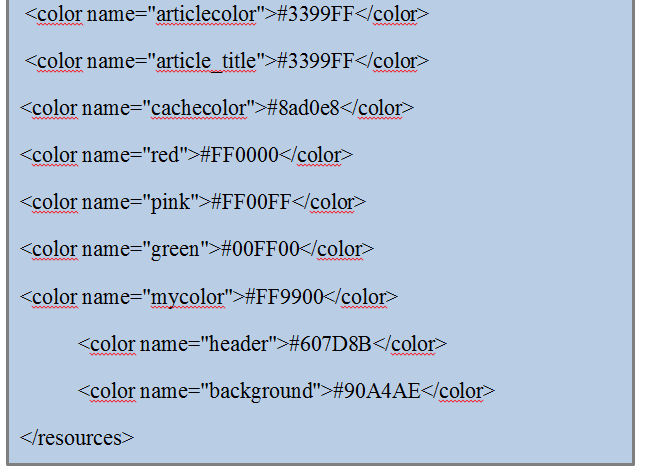
themes.xml file in the res/values folder.
following code:
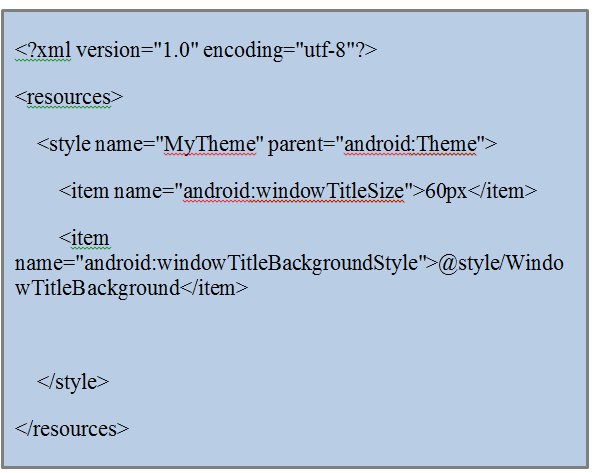
created style should be added to the theme file.
open the android manifest file and apply the theme to the whole application or activity.

the custom title bar. The layout can contain any android controls. You can add
even the logo of the application, any images, or any controls as well. In the below
layout code, I am just adding the text. No other controls and no images. If you
want you can add them. I created a layout header.xml with the below code in it:
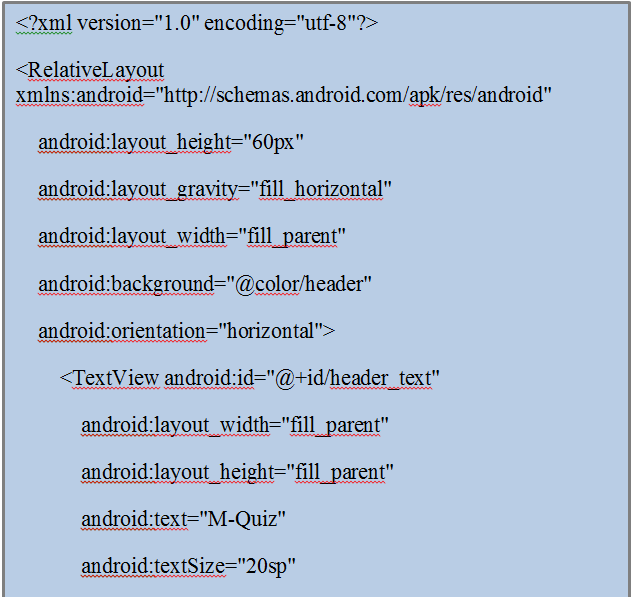
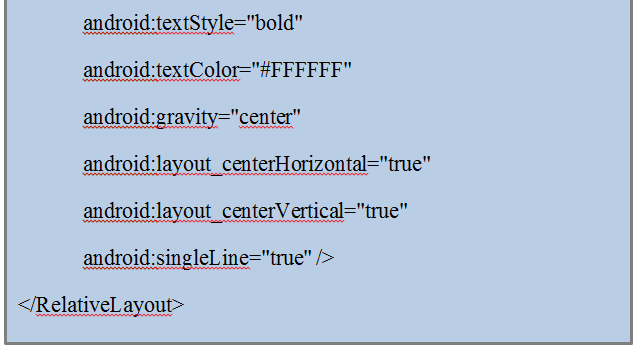
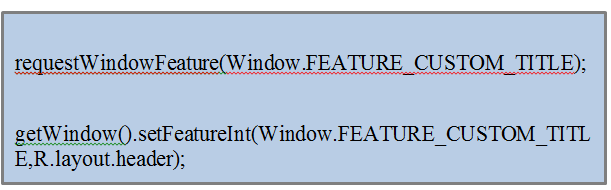
to add the following code to the create() method of the activity.
application and check. You can see the customized title bar on top as below :
Coding…
If you forget any of the steps above, you may get the below force closed. You can see this error in the log:
Normal
0
false
false
false
EN-IN
X-NONE
X-NONE
/* Style Definitions */
table.MsoNormalTable
{mso-style-name:”Table Normal”;
mso-tstyle-rowband-size:0;
mso-tstyle-colband-size:0;
mso-style-noshow:yes;
mso-style-priority:99;
mso-style-parent:””;
mso-padding-alt:0cm 5.4pt 0cm 5.4pt;
mso-para-margin-top:0cm;
mso-para-margin-right:0cm;
mso-para-margin-bottom:10.0pt;
mso-para-margin-left:0cm;
line-height:115%;
mso-pagination:widow-orphan;
font-size:11.0pt;
font-family:”Calibri”,”sans-serif”;
mso-ascii-font-family:Calibri;
mso-ascii-theme-font:minor-latin;
mso-hansi-font-family:Calibri;
mso-hansi-theme-font:minor-latin;
mso-fareast-language:EN-US;}
You cannot combine custom titles with other title features
To fix this issue, you need to add the below line in themes.xml
Normal
0
false
false
false
EN-IN
X-NONE
X-NONE
/* Style Definitions */
table.MsoNormalTable
{mso-style-name:”Table Normal”;
mso-tstyle-rowband-size:0;
mso-tstyle-colband-size:0;
mso-style-noshow:yes;
mso-style-priority:99;
mso-style-parent:””;
mso-padding-alt:0cm 5.4pt 0cm 5.4pt;
mso-para-margin-top:0cm;
mso-para-margin-right:0cm;
mso-para-margin-bottom:10.0pt;
mso-para-margin-left:0cm;
line-height:115%;
mso-pagination:widow-orphan;
font-size:11.0pt;
font-family:”Calibri”,”sans-serif”;
mso-ascii-font-family:Calibri;
mso-ascii-theme-font:minor-latin;
mso-hansi-font-family:Calibri;
mso-hansi-theme-font:minor-latin;
mso-fareast-language:EN-US;}
or in the AndroidManifest.xml, you need to remove the below code for that particular activity
Normal
0
false
false
false
EN-IN
X-NONE
X-NONE
/* Style Definitions */
table.MsoNormalTable
{mso-style-name:”Table Normal”;
mso-tstyle-rowband-size:0;
mso-tstyle-colband-size:0;
mso-style-noshow:yes;
mso-style-priority:99;
mso-style-parent:””;
mso-padding-alt:0cm 5.4pt 0cm 5.4pt;
mso-para-margin-top:0cm;
mso-para-margin-right:0cm;
mso-para-margin-bottom:10.0pt;
mso-para-margin-left:0cm;
line-height:115%;
mso-pagination:widow-orphan;
font-size:11.0pt;
font-family:”Calibri”,”sans-serif”;
mso-ascii-font-family:Calibri;
mso-ascii-theme-font:minor-latin;
mso-hansi-font-family:Calibri;
mso-hansi-theme-font:minor-latin;
mso-fareast-language:EN-US;}
android:theme=“@android:style/Theme.Black.NoTitleBar”
And you need to add the code in mainactivity.java or wherever you want the custom window title to be displayed: